Most people do not need more AI-generated content. They need better memory.

Most people do not need more AI-generated content.
They need better memory.
Not perfect memory. Useful memory. A system that helps them remember what they saved, what they learned, what they decided, what changed, and what still matters.
Right now, most of us live in the opposite world.
We save articles we never revisit. We bookmark threads we cannot find later. We keep notes in one app, screenshots in another, PDFs in a folder, voice notes somewhere else, and half-finished thoughts scattered across tabs, chats, documents, and desktops.
We are not short on information.
We are drowning in uncompiled information.
The villain is your notes app
Notion. Evernote. Apple Notes. Google Keep. Obsidian. Bear.
They all promise the same thing: organize your thinking.
They all deliver the same thing: storage.
You save something. Tag it. Maybe highlight it. Then mostly forget it exists.
That is not because you are disorganized. It is because every traditional knowledge tool still depends on a human doing the hardest part of the work: deciding what matters, summarizing it, connecting it to other things, revisiting it later, and turning it into something useful.
That is the maintenance burden nobody keeps up with.
Your notes app is a filing cabinet that never files itself.
And filing cabinets do not think.The idea that changed how people see this problem
Andrej Karpathy recently described a workflow that made this click for a lot of people. 14.2 million views. 85,000 bookmarks. Not because it was flashy — because it was obvious in the way the best ideas are.
He collects source material into a raw/ folder, then uses an LLM to incrementally compile it into an interlinked markdown wiki. The model maintains summaries, backlinks, and concept pages. The human curates sources, asks questions, and reads the result. At around 100 articles and 400,000 words, you can ask complex research questions and the model synthesizes answers from the interconnected wiki — no RAG pipeline, no vector database, no infrastructure. Just files.
The key insight is not that the system answers questions. It is that the wiki becomes a persistent, compounding artifact that gets richer over time instead of forcing the model to rediscover everything from scratch on every query.
Nick Spisak then did something equally important: he made the idea feel startable. His beginner flow — create a few folders, fill them with source material, write a schema file, tell the AI to compile — reduced activation energy to near zero. His expansion post hit 132,000 views, and the lead capture page for a downloadable “skill” that sets up the system proved the demand was real. People did not just want to admire the idea. They wanted the first 20 minutes solved.
But both versions are still starter systems.
They work beautifully for research. Papers do not change every hour. Articles stay fixed. A single person benefits from a growing map of the field.
Real life requires more than a librarian.
Not everything you save is the same kind of information
This is the part most people miss.
A wiki treats everything as knowledge. But most people do not just need help remembering what they read. They need help remembering what they decided, why they decided it, what is true right now, what changed since last week, what constraints matter, and what should happen next.
A wiki is good at knowledge. Life and work need memory, live state, decisions, behavior rules, and action.
That is why the next version of this category is not an AI wiki. It is an agent brain.
The difference is one layer of separation:
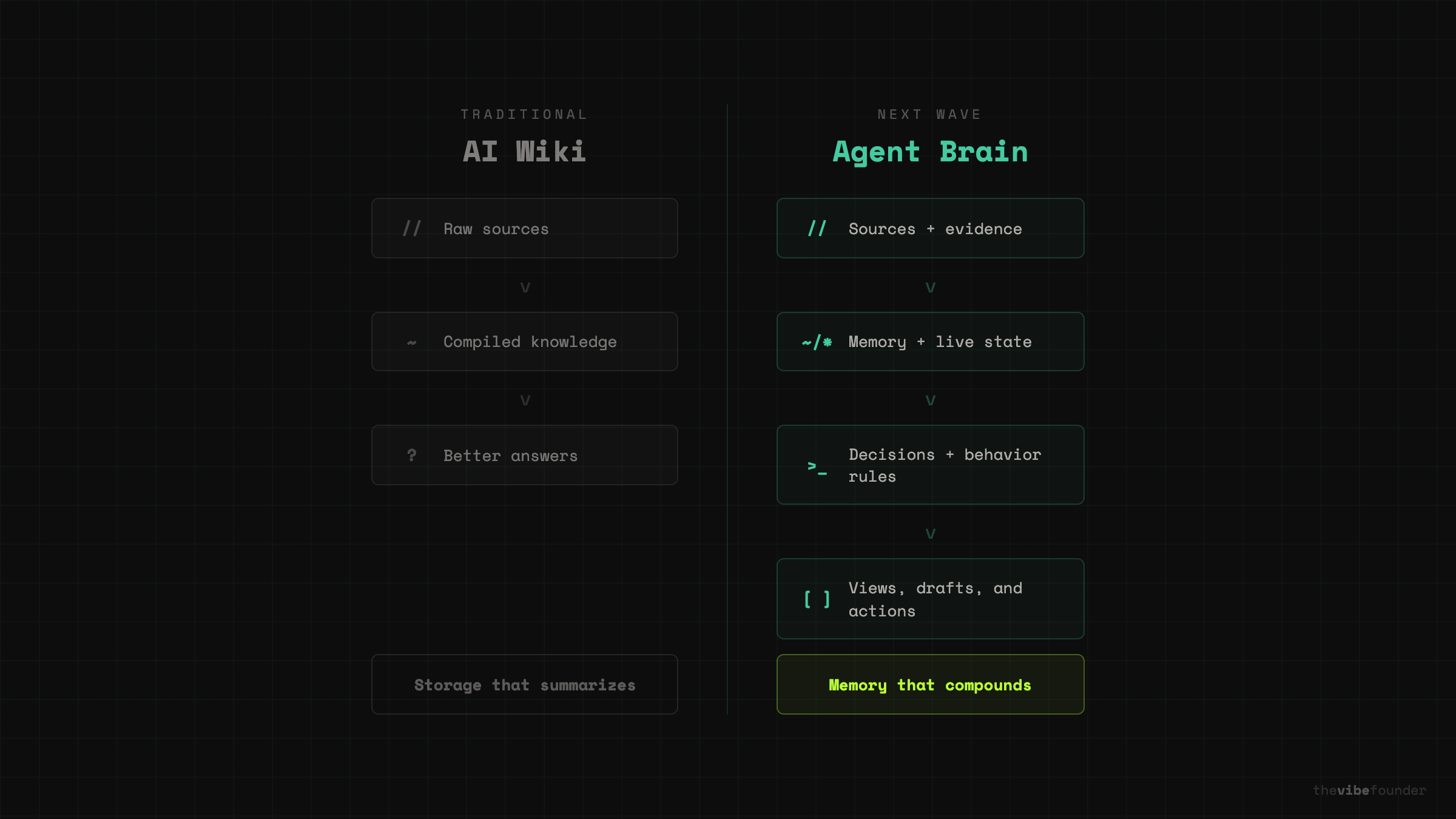
An AI wiki says: raw sources → compiled knowledge → better answers.
An agent brain says: sources + memory + live state + decisions + behavior rules → useful views, drafts, and actions.
Here is what each layer actually is — with a real example of what a file in that folder looks like.
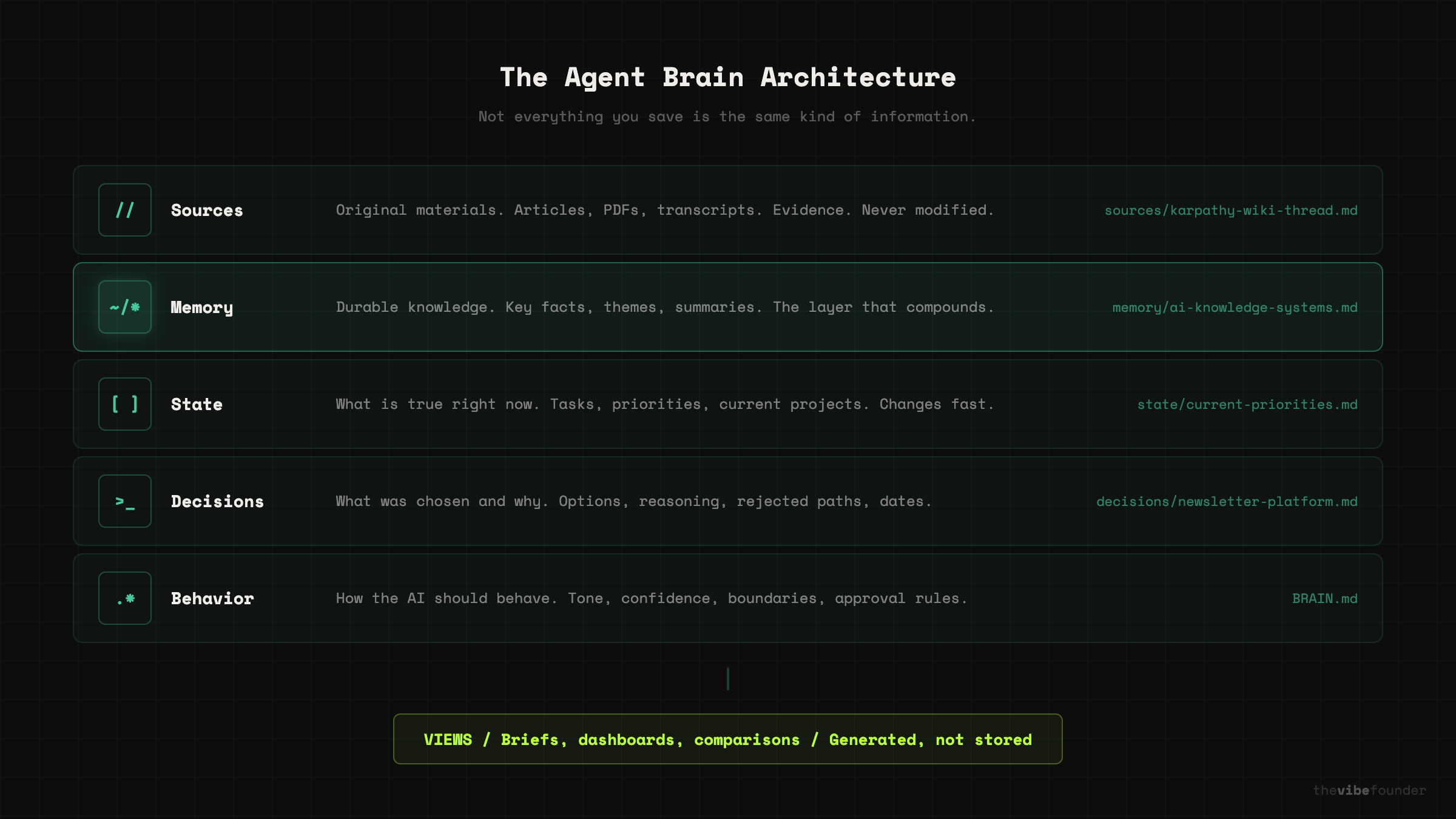
Sources. Original materials. Articles, meeting notes, screenshots, PDFs, transcripts. These are evidence. They stay close to original. Example file: sources/karpathy-ai-wiki-tweet-march-2026.md — a saved copy of the original thread.
Memory. What seems worth keeping. Key facts, recurring themes, important people, summaries, relationships. This is the durable layer. Example file: memory/ai-knowledge-systems.md — a compiled summary of what you know about this space, updated as new sources come in.
State. What is true right now. Calendar, tasks, current projects, recent analytics, short-term priorities. This is the fresh layer. Example file: state/current-priorities.md — three bullet points about what matters this week.
Decisions. What was chosen and why. The question, the options, the choice, the rejected paths, the reasoning, the evidence, and the date. This is how you recover judgment later. Example file: decisions/2026-03-newsletter-platform.md — why you chose Substack over Beehiiv, with the tradeoffs you weighed.
Behavior rules. How the AI should behave. Tone, confidence, confidentiality, approval rules, style boundaries. This is how AI stops feeling generic. Example file: BRAIN.md — a root-level instruction file that tells the model what this system is for and how careful it should be.
Views. What the human actually wants to read. A one-page brief. A weekly plan. A comparison. A dashboard. These are generated from the layers above, not stored as permanent truth.
That separation is the whole idea.
A screenshot from last week is not the same kind of thing as a durable insight. A summary is not the same thing as the original source. A calendar snapshot is not the same thing as a decision record. A generated dashboard is not the same thing as a piece of evidence.
The better your system separates those layers, the more trustworthy it becomes.What my own system looks like
I have been running a version of this for my newsletter workflow.
My sources/ folder has saved Anthropic help docs, product announcements, and X threads I pull when researching a post. My memory/ folder has compiled notes on every AI product I have covered — what I said about it, and what changed since. My state/ folder tracks what I am working on this week, what posts are in progress, and what is queued. My decisions/ folder has notes like “why I chose to frame the Claude Code leak as an architecture story, not a security story” — short files that capture reasoning I would otherwise forget in a week.
The BRAIN.md file at the root tells the model: you are helping a solo founder write analysis for builders. Be direct, not tutorial-mode. Prioritize original framing over feature recaps. Flag when a claim needs a source. Never assume the reader is non-technical.
When I sit down to write, I do not start from zero. I ask the system: “What do I know about this topic? What have I already said about it? What has changed since the last time I covered it?” The answers come back grounded in my own files, not a generic model’s best guess.
That is not a second brain.
It is a first draft of useful institutional memory for a team of one.
How a normal person can start this week
The mistake would be dumping the full architecture on people all at once.
Here is the beginner version I would actually recommend.
Step 1: Pick one area, not your whole life.
Do not try to build a brain for everything. Choose one area where information is already piling up: a job search, health research, a move, learning a topic, content planning, one work project, college applications, a home purchase.
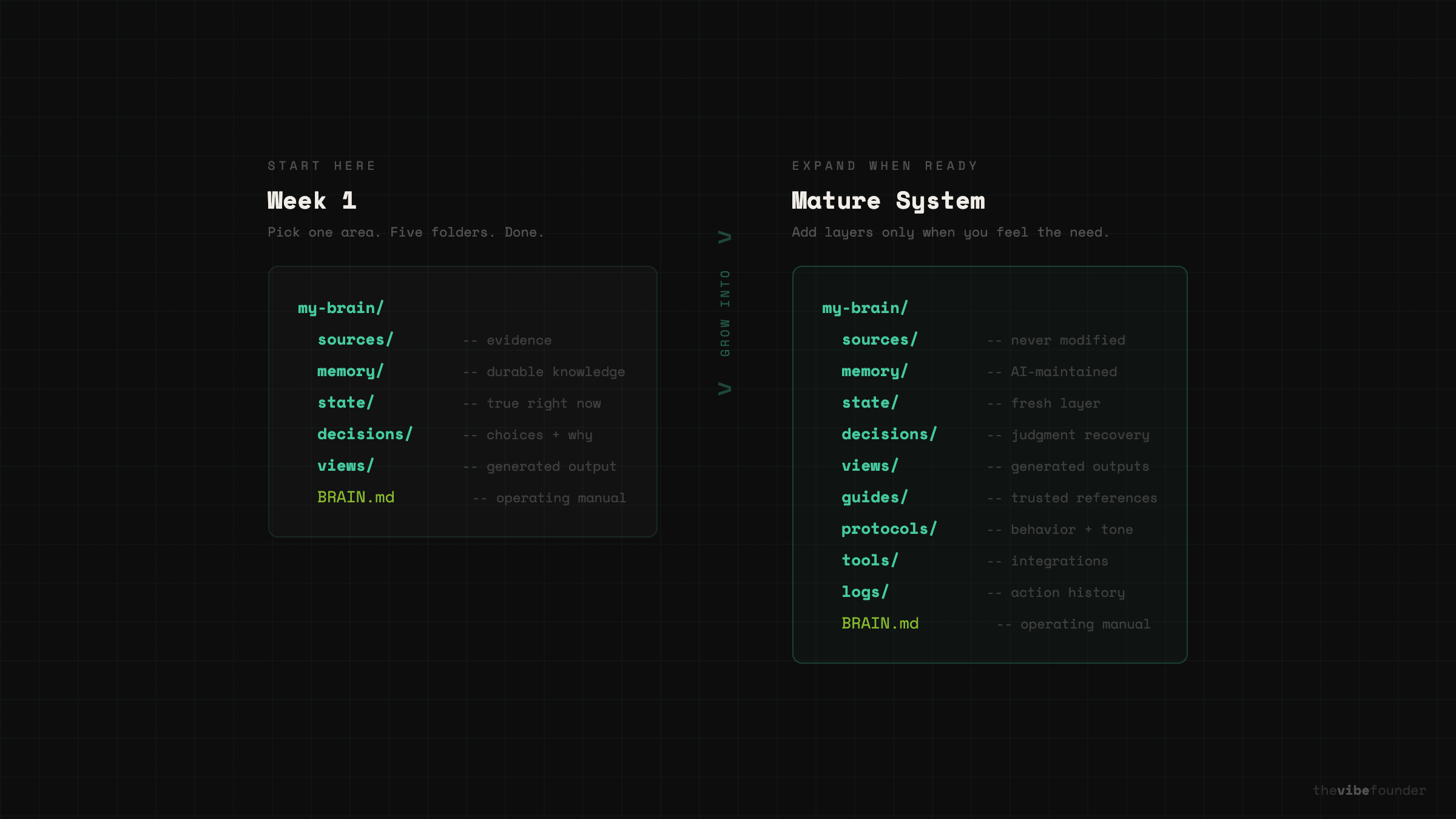
Step 2: Create five folders.
my-brain/
  sources/
  memory/
  state/
  decisions/
  views/
Simple enough for anyone to start, but already better than a single raw/ folder because it introduces the most important distinction early: not everything you save is the same kind of information.
Step 3: Add 10 to 20 real files.
Drop in things you already have. Articles, notes, screenshots, PDFs, meeting notes, transcripts, a rough task list, a current calendar summary, old plans. Do not over-organize by hand. That is the AI’s job.
Step 4: Create one instruction file.
At the root, add BRAIN.md. This is the file that turns a generic AI into your AI. Here is a starter template you can copy and edit:# BRAIN.md

## What This System Is For
A personal knowledge base about [YOUR TOPIC].
The goal is to help me remember what I’ve learned, what I’ve decided,
and what matters right now — not just store files.

## How the Folders Work
- sources/ contains original material. Never modify these files.
- memory/ contains durable knowledge the AI maintains. Summaries, key
  facts, recurring themes, important relationships.
- state/ contains what is true right now. Tasks, priorities, deadlines,
  current status. This changes frequently.
- decisions/ contains records of choices I made and why. Include the
  question, options considered, what I chose, what I rejected, and the
  reasoning.
- views/ contains generated outputs. Briefs, overviews, comparisons.
  These are presentation, not truth — regenerate them anytime.

## Rules for the AI
- Always cite which source a claim comes from
- Mark uncertain claims as uncertain
- Never modify files in sources/
- When information conflicts, flag it instead of picking a winner
- Keep memory/ entries concise — one file per concept or theme
- Mark anything in state/ with a “last updated” date
- Use plain language. No jargon unless the source material uses it.
- When I ask a question, check memory/ and state/ before sources/

## What Counts as a Good Output
- Short. One page or less unless I ask for more.
- Grounded. Every important claim should trace back to a source.
- Honest about gaps. Say “I don’t have information on this” when true.
Edit this to match your topic, your tone, and your standards. The more specific you are about how the AI should behave, the less generic the outputs become.
Step 5: Ask the AI to compile, not just answer.
Do not ask “What do these files say?” Ask “Turn these files into a system.”
A simple starting prompt:
Read everything in sources/.

Then:
1. Summarize each important source
2. Extract recurring ideas
3. Put durable takeaways in memory/
4. Put time-sensitive information in state/
5. Create decision notes in decisions/ when the files show a real choice was made
6. Create a readable overview in views/ explaining what matters most right now
7. Include confidence and source references for important claims
That one instruction already moves the system beyond a generic chatbot.
Step 6: Review before promoting.
Do not let every AI output become permanent memory. Check it. Correct mistakes. Delete fluff. Rewrite vague points. Keep uncertain claims out of durable memory.
Run periodic health checks. Here is a prompt you can use:
Review the full knowledge base. Check for:
1. Claims in memory/ that have no source in sources/
2. Contradictions between memory/ files
3. Anything in state/ that looks stale or outdated
4. Decision records in decisions/ that are missing reasoning or date
5. Wiki-style summaries that have drifted from the original source
6. Gaps — important topics mentioned repeatedly but never summarized

Report what you find. Do not auto-fix. Let me decide.
Karpathy’s own pattern includes linting and health checks for contradictions, stale claims, and unsupported ideas. That is not a side detail. It is one of the most important product truths in this space: filed-back errors compound.
Step 7: Use recurring questions.
Once the first version exists, come back to it regularly. Here are prompts worth reusing:
What changed this week?
What decisions have already been made?
What is still uncertain or unresolved?
What themes keep repeating across these files?
What should I focus on next based on current state?
What in state/ is stale and needs updating?
What deserves a one-page brief right now?
This is when the system starts feeling alive. You are not just querying files. You are querying a compiled version of your own thinking.
Step 8: Add more layers only when needed.
Only after the simple version proves useful should you expand. Here is what a more mature system looks like:
my-brain/
  sources/          ← original materials, never modified
  memory/           ← durable knowledge, AI-maintained
  state/            ← what is true right now
  decisions/        ← choices made and why
  views/            ← generated outputs and briefs
  guides/           ← trusted reference material you want the AI to follow
  protocols/        ← behavior rules, tone, boundaries
  tools/            ← approved capabilities and integrations
  logs/             ← action history and change tracking
  BRAIN.md          ← the operating manual
That is the graduation path, not the starting point.
Why local-first matters
The winning version of this category should be local-first.
Not because it sounds sophisticated. Because people trust what they can inspect.
One reason Karpathy’s setup is compelling is that it is built on plain files and markdown. The wiki is readable by humans. The sources are visible. The structure can be versioned. The whole thing can live in a normal folder. That is a huge contrast to black-box systems where nobody can tell what the assistant knows, where it got the answer, or how the answer changed over time.
If AI is going to help with memory, decisions, and action, the underlying system has to stay legible. Files should remain inspectable. Raw sources should stay preserved. Generated summaries should be distinguishable from evidence. Live state should be marked as fresh or stale. Actions should be logged.
Local-first is not a technical preference. It is a product design decision about trust.
The next wave of AI is not more content. It is more continuity.
The best AI systems will not just answer one question at a time. They will accumulate context. Preserve reasoning. Track what changed. Distinguish between evidence and summary. Help people recover decisions. Produce useful views. And eventually take limited, permissioned action.
Karpathy proved the pattern. Nick proved people wanted the shortcut. The next step is to turn it into a real category.
Not just an AI wiki. Not just a second brain.
A local-first agent brain that turns scattered files, decisions, and live context into usable memory.
Once you see it, it becomes very hard to settle for a chatbot that forgets everything the moment the tab closes.
— Aj, @thevibefounder